MakeID-Life2.3.1
Publisher Description

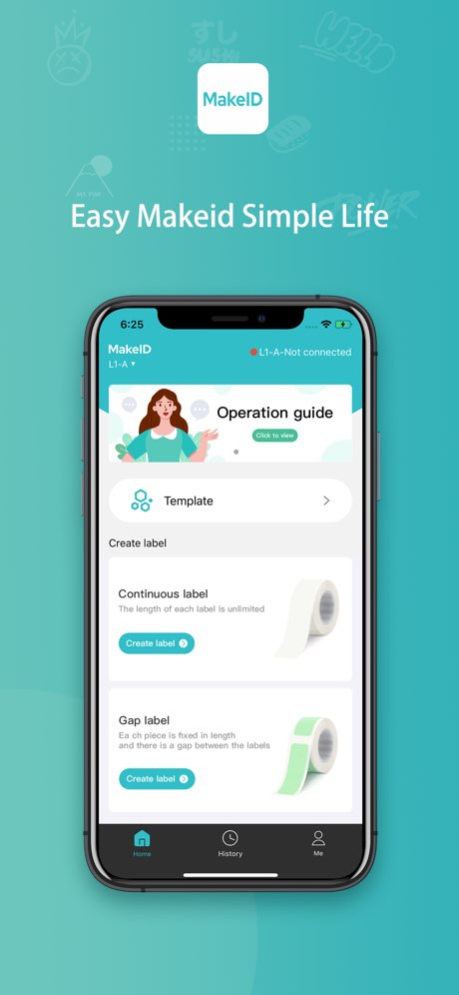


MakeID-Life is an application used to make labels. The label printing function can be realized by connecting Jingjing household label machine-dumpling machine and typewriter. You can easily make interesting and exquisite labels to make your life orderly and more interesting.
1. You can print all kinds of labels that need to be classified and identified in your life to keep your life organized.
2. You can manage food, medicines, cosmetics, and put on the opening date, purchase date, expiration time, a label can make the whole family feel at ease.
3. You can affix identification tags to your baby's various personal items, exclusive supplies, complementary foods and health products to protect your baby's healthy growth.
4. You can choose a variety of fonts, symbols, and borders to design the label, and make your life more orderly and more interesting with one tap.
5. Baixiong loves to play, and can print everything you can think of and can't think of. Playing with labels makes life more interesting.
Version History Compatible Devices – Supports L1, Q1, E1, S1 Pro, M1, T7, D7 and other home printers. 2.3.1 Aug 3 修改APP一些关键信息 2.3.0 05/28/2025 Added printer connection guide 2.2.0 04/30/2025 Fix known issues and improve user experience 2.1.0 04/11/2025 1. Optimize S1 Pro printer button guidance
2. Q1 printer adds multiple label size adaptations
3. Templates, stickers and other materials updated 2.0.0 04/29/2024 1. Templates, stickers and other materials updated
2. Fix known issues and optimize user experience 1.9.9 03/21/2024 1. Templates, stickers and other materials updated
2. Optimize user experience 1.9.8 02/04/2024 1. A new printer type S1 Pro is added
2. Templates, stickers and other materials updated
3. Optimize user experience 1.9.6 01/02/2024 1. New Mother's Day templates, stickers, and borders
2. New fonts
3. Optimization of labeling machine connection 1.9.3 05/09/2023 1. Add tag purchase entrance in APP
2. Update the privacy policy
3. Optimize user experience 1.9.2 04/07/2023 Optimize user experience 1.9.1 01/04/2023 Fixed Some Bugs 1.8.9 12/22/2022 1.New holiday templates and stickers
2.Fixed Some Bugs 1.8.8 12/13/2022 Fixed Some Bugs 1.8.7 09/10/2022 1. Added Italian language
2. Revised homepage UI
3. Add date button format setting
4. Add custom button history 1.8.5 08/26/2022 修復了一些bug 1.8.4 08/04/2022 1.New Label Printer Launch - Q1
2.Fixed Some Bugs 1.8.3 06/21/2022 The printing functions of some stickers, borders, 2D codes and barcodes are added. 1.8.2 04/12/2022 1、German, French, Spanish and other languages have been added
2、The portal for user feedback is added. Any comments can be fed back to us
3、The overall page layout is changed, the waterfall flow of the home page is cancelled, and the UI interface is adjusted as a whole
4、Updated template design 1.8.0 12/22/2021 1. Compatible with L1AH printer
2. Optimized some user experience and modified some bugs 1.7.4 09/22/2021 1、A new printer type L1-A is added
2、Optimized some interactive experience, modified some bugs 1.7.1 06/05/2021 Big update! This time we support four languages, Chinese, Japanese, English and Korean, and we've updated a bunch of interesting templates to try it out. 1.7.0 02/07/2021 1、新增韩语翻译
2、修复其他已知BUG 1.0.3 11/06/2020 修复一些已知BUG 1.0.1 06/03/2020 1.0 04/02/2020
About MakeID-Life
The company that develops MakeID-Life is Chongqing Jingranyouxu Technology Co., Ltd.. The latest version released by its developer is 2.3.1.
To install MakeID-Life on your iOS device, just click the green Continue To App button above to start the installation process. The app is listed on our website since 2026-10-08 and was downloaded 3 times. We have already checked if the download link is safe, however for your own protection we recommend that you scan the downloaded app with your antivirus. Your antivirus may detect the MakeID-Life as malware if the download link is broken.
How to install MakeID-Life on your iOS device:
- Click on the Continue To App button on our website. This will redirect you to the App Store.
- Once the MakeID-Life is shown in the iTunes listing of your iOS device, you can start its download and installation. Tap on the GET button to the right of the app to start downloading it.
- If you are not logged-in the iOS appstore app, you'll be prompted for your your Apple ID and/or password.
- After MakeID-Life is downloaded, you'll see an INSTALL button to the right. Tap on it to start the actual installation of the iOS app.
- Once installation is finished you can tap on the OPEN button to start it. Its icon will also be added to your device home screen.
Program Details
System requirements
Download information
Pricing
Version History
version 2.3.1
posted on 2026-10-08
Version History Compatible Devices – Supports L1, Q1, E1, S1 Pro, M1, T7, D7 and other home printers. 2.3.1 Aug 3 修改APP一些关键信息 2.3.0 05/28/2025 Added printer connection guide 2.2.0 04/30/2025 Fix known issues and improve user experience 2.1.0 04/11/2025 1. Optimize S1 Pro printer button guidance
2. Q1 printer adds multiple label size adaptations
3. Templates, stickers and other materials updated 2.0.0 04/29/2024 1. Templates, stickers and other materials updated
2. Fix known issues and optimize user experience 1.9.9 03/21/2024 1. Templates, stickers and other materials updated
2. Optimize user experience 1.9.8 02/04/2024 1. A new printer type S1 Pro is added
2. Templates, stickers and other materials updated
3. Optimize user experience 1.9.6 01/02/2024 1. New Mother's Day templates, stickers, and borders
2. New fonts
3. Optimization of labeling machine connection 1.9.3 05/09/2023 1. Add tag purchase entrance in APP
2. Update the privacy policy
3. Optimize user experience 1.9.2 04/07/2023 Optimize user experience 1.9.1 01/04/2023 Fixed Some Bugs 1.8.9 12/22/2022 1.New holiday templates and stickers
2.Fixed Some Bugs 1.8.8 12/13/2022 Fixed Some Bugs 1.8.7 09/10/2022 1. Added Italian language
2. Revised homepage UI
3. Add date button format setting
4. Add custom button history 1.8.5 08/26/2022 修復了一些bug 1.8.4 08/04/2022 1.New Label Printer Launch - Q1
2.Fixed Some Bugs 1.8.3 06/21/2022 The printing functions of some stickers, borders, 2D codes and barcodes are added. 1.8.2 04/12/2022 1、German, French, Spanish and other languages have been added
2、The portal for user feedback is added. Any comments can be fed back to us
3、The overall page layout is changed, the waterfall flow of the home page is cancelled, and the UI interface is adjusted as a whole
4、Updated template design 1.8.0 12/22/2021 1. Compatible with L1AH printer
2. Optimized some user experience and modified some bugs 1.7.4 09/22/2021 1、A new printer type L1-A is added
2、Optimized some interactive experience, modified some bugs 1.7.1 06/05/2021 Big update! This time we support four languages, Chinese, Japanese, English and Korean, and we've updated a bunch of interesting templates to try it out. 1.7.0 02/07/2021 1、新增韩语翻译
2、修复其他已知BUG 1.0.3 11/06/2020 修复一些已知BUG 1.0.1 06/03/2020 1.0 04/02/2020
version 2.3.0
posted on 2026-07-24
Version History 修改APP一些关键信息 2.3.0 05/28/2025 Added printer connection guide 2.2.0 04/30/2025 Fix known issues and improve user experience 2.1.0 04/11/2025 1. Optimize S1 Pro printer button guidance
2. Q1 printer adds multiple label size adaptations
3. Templates, stickers and other materials updated 2.0.0 04/29/2024 1. Templates, stickers and other materials updated
2. Fix known issues and optimize user experience 1.9.9 03/21/2024 1. Templates, stickers and other materials updated
2. Optimize user experience 1.9.8 02/04/2024 1. A new printer type S1 Pro is added
2. Templates, stickers and other materials updated
3. Optimize user experience 1.9.6 01/02/2024 1. New Mother's Day templates, stickers, and borders
2. New fonts
3. Optimization of labeling machine connection 1.9.3 05/09/2023 1. Add tag purchase entrance in APP
2. Update the privacy policy
3. Optimize user experience 1.9.2 04/07/2023 Optimize user experience 1.9.1 01/04/2023 Fixed Some Bugs 1.8.9 12/22/2022 1.New holiday templates and stickers
2.Fixed Some Bugs 1.8.8 12/13/2022 Fixed Some Bugs 1.8.7 09/10/2022 1. Added Italian language
2. Revised homepage UI
3. Add date button format setting
4. Add custom button history 1.8.5 08/26/2022 修復了一些bug 1.8.4 08/04/2022 1.New Label Printer Launch - Q1
2.Fixed Some Bugs 1.8.3 06/21/2022 The printing functions of some stickers, borders, 2D codes and barcodes are added. 1.8.2 04/12/2022 1、German, French, Spanish and other languages have been added
2、The portal for user feedback is added. Any comments can be fed back to us
3、The overall page layout is changed, the waterfall flow of the home page is cancelled, and the UI interface is adjusted as a whole
4、Updated template design 1.8.0 12/22/2021 1. Compatible with L1AH printer
2. Optimized some user experience and modified some bugs 1.7.4 09/22/2021 1、A new printer type L1-A is added
2、Optimized some interactive experience, modified some bugs 1.7.1 06/05/2021 Big update! This time we support four languages, Chinese, Japanese, English and Korean, and we've updated a bunch of interesting templates to try it out. 1.7.0 02/07/2021 1、新增韩语翻译
2、修复其他已知BUG 1.0.3 11/06/2020 修复一些已知BUG 1.0.1 06/03/2020 1.0 04/02/2020
version 2.3.0
posted on 2025-05-28
May 28, 2025
Version 2.3.0
修改APP一些关键信息
version 2.3.0
posted on 2025-05-28
修改APP一些关键信息
version 2.2.0
posted on 2025-04-30
Apr 30, 2025
Version 2.2.0
Added printer connection guide
version 2.1.0
posted on 2025-04-11
Apr 11, 2025
Version 2.1.0
Fix known issues and improve user experience
version 2.0.0
posted on 2024-04-29
Apr 29, 2024
Version 2.0.0
1. Optimize S1 Pro printer button guidance
2. Q1 printer adds multiple label size adaptations
3. Templates, stickers and other materials updated
version 1.9.9
posted on 2024-03-21
Mar 21, 2024
Version 1.9.9
1. Templates, stickers and other materials updated
2. Fix known issues and optimize user experience
version 1.9.8
posted on 2024-02-04
Feb 4, 2024
Version 1.9.8
1. Templates, stickers and other materials updated
2. Optimize user experience
version 1.9.6
posted on 2024-01-02
Jan 2, 2024
Version 1.9.6
1. A new printer type S1 Pro is added
2. Templates, stickers and other materials updated
3. Optimize user experience
